
Table of Contents
- Managed IT Services' Top Benefits to Modern Firms
- Key Benefits of Managed IT Services
- Types of Managed IT Services
- Onsite vs. Cloud-Based Managed IT
- Virtual Chief Information Officer (VCIO) and Virtual Chief Information Security Officer (VCISO)
- Choosing a Managed IT Service Provider
- Are There Any Cons to Managed IT Services?
- Work with Stratify IT
- Frequently Asked Questions
Managed IT Services' Top Benefits to Modern Firms
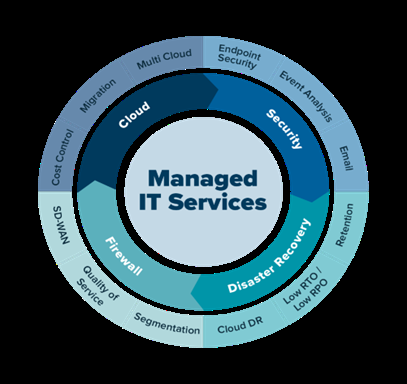 Managed IT services allow businesses to outsource defined IT functions, monitoring, security, patching, help desk, cloud management, to a specialized provider in exchange for a predictable monthly fee. The result is technology that runs consistently, gets maintained before problems escalate, and scales with the business without requiring a proportional increase in internal IT staff.
Cloud decision, the role of virtual IT executives, and the honest tradeoffs every business should weigh before committing.
Key Benefits of Managed IT Services
Cost Efficiency and Predictable Spending
Managed services convert IT from a variable cost into a fixed monthly expense. Instead of budgeting for emergency hardware replacements, unplanned consultant fees, and reactive incident response, organizations pay a consistent per-user or per-device fee that covers defined services. This eliminates the budget surprises that internal IT generates and allows finance teams to plan IT spending with confidence. For organizations where a significant data breach or prolonged outage would represent a material financial event, the predictability alone has real value.
24/7 Monitoring and Faster Incident Response
MSPs monitor client environments continuously through a Network Operations Center (NOC), identifying issues, a failing drive, a security alert, an application outage, before they become service disruptions. For businesses that operate outside standard hours or that depend on continuous system availability, this eliminates the gap between a problem occurring and someone discovering it the following morning. Defined SLAs specify response times by incident severity, giving businesses predictable recovery expectations rather than best-effort responses from an overwhelmed internal team.
Security and Compliance Coverage
Maintaining a consistent security posture across a growing organization requires tools and processes that small IT teams struggle to operate at scale. MSPs deploy and manage endpoint detection and response (EDR), DNS filtering, MFA enforcement, and patch management uniformly across all devices, including new ones as they're onboarded. For more on how managed IT support improves day-to-day operations beyond the security layer, that is covered in detail separately. For organizations subject to HIPAA, CMMC, PCI-DSS, or SOC 2, MSPs with compliance experience implement the required controls as an ongoing function rather than a one-time project, reducing the risk of findings that result from configuration drift or outdated policies.
Access to Specialized Expertise
An MSP operating across dozens of client environments maintains depth across security, cloud platforms, compliance frameworks, and infrastructure that would be prohibitively expensive to staff internally. A 50-person company can't hire a cloud architect, a security analyst, a compliance specialist, and a network engineer, but it can access all of those capabilities through a managed services contract. This is particularly relevant as cloud environments have become more complex and security requirements have intensified; the breadth of knowledge required has grown faster than most internal teams can scale.
Scalability Without Hiring Cycles
Onboarding new employees, opening additional locations, or completing an acquisition generates immediate IT demand, device provisioning, user account setup, network extension, security configuration. When an MSP manages the environment, that demand is absorbed by the existing project rather than requiring a recruiting process that lags the business need by months. Services scale with the organization in both directions: adding capacity when demand grows and reducing it when it contracts, without the fixed costs of permanent headcount.
Internal Teams Can Focus on Strategic Work
In organizations where IT responsibilities fall on people with other primary roles, a finance manager handling helpdesk tickets, an operations director troubleshooting the VPN, outsourcing routine IT management redirects that time to work that directly affects the business. For dedicated IT staff, managed services absorb the operational load (patching, monitoring, tier-1 support) so that internal focus can shift to projects, architecture decisions, and business-facing technology work.
Types of Managed IT Services
MSP projects vary by client, but these service categories are consistently central to most managed IT contracts:
Network and Infrastructure Management: Setup, monitoring, and maintenance of network infrastructure, routers, firewalls, switches, wireless. Includes patch management for network devices, configuration management, and 24/7 alerting when devices go offline or performance degrades.
Endpoint Security (EDR): Deployment and management of endpoint detection and response software across all endpoints, laptops, desktops, servers. EDR provides behavioral threat detection that identifies lateral movement, unusual process execution, and early-stage ransomware activity, enabling containment before an incident spreads.
Help Desk Support: Tiered support for end-user issues, typically with defined SLAs by severity. Tier 1 handles password resets, connectivity issues, and application errors. Higher tiers handle infrastructure problems and project work. Available during business hours or 24/7 depending on contract tier.
Cloud Services Management: Provisioning, configuration, and ongoing management of cloud environments, Microsoft 365, Azure, AWS, Google Workspace. Includes license management, security configuration, and support for cloud-hosted applications.
Data Backup and Recovery: Managed backup with defined recovery time objectives (RTOs) and recovery point objectives (RPOs), tested regularly. Includes offsite or cloud-based storage to protect against ransomware that encrypts on-premise backup systems.
Compliance and Regulatory Support: For organizations subject to HIPAA, CMMC, PCI-DSS, or SOC 2, managed compliance services implement and maintain required controls, policy documentation, and audit preparation.
Data Analytics and Business Intelligence: Some MSPs extend into data management services, helping organizations collect, store, and structure data for analysis, and ensuring compliance with data protection requirements across those environments.
Onsite vs. Cloud-Based Managed IT
Organizations choosing a managed IT model must also decide where their infrastructure lives.
Onsite managed IT involves physical servers and IT infrastructure on business premises, managed by an external provider. This model offers direct control over hardware and clear physical security boundaries, access to servers is restricted to authorized personnel on-site. The tradeoff is higher capital cost (hardware purchase, power, cooling, space) and more limited scalability, since expanding physical infrastructure is more expensive and time-consuming than adding cloud capacity.
Cloud-based managed IT eliminates on-premise hardware in favor of services hosted and managed by third-party providers. Capital expenditures are replaced by operational costs; scaling is a configuration change rather than a procurement cycle. The concerns are real, dependency on internet connectivity and data security in shared environments, but reputable providers operate within compliance frameworks (FedRAMP, SOC 2, ISO 27001) that address these risks directly.
Most organizations today operate a hybrid model: cloud for productivity tools, SaaS applications, and scalable compute; on-premise or co-location for workloads with data residency requirements or latency sensitivity. The right answer depends on regulatory requirements, existing infrastructure investment, and operational priorities.
Virtual Chief Information Officer (VCIO) and Virtual Chief Information Security Officer (VCISO)
Hiring full-time C-suite IT executives is out of reach for most small and mid-size businesses. Virtual officers provide executive-level guidance on a fractional basis, typically through an MSP engagement, without the salary, benefits, and overhead of a permanent hire.
Role and Impact
A VCIO works with business leadership to develop and execute an IT strategy aligned with company objectives, overseeing IT budgets, managing technology investments, and ensuring the organization's infrastructure supports its growth plans. A VCISO focuses on cybersecurity: establishing security policies, conducting risk assessments, managing compliance obligations, and building the security program that protects organizational data.
Why Fractional Works
For most SMBs, the need for strategic IT leadership is real but not full-time. A VCIO or VCISO engaged through an MSP brings specialized knowledge to specific decisions, a cloud migration, a compliance program, a security incident response framework, without the cost of a permanent executive. The external perspective also matters: virtual officers bring experience from multiple organizations and can identify patterns and approaches that an internal hire, seeing only one environment, might not.
Strategic Impact
Both roles contribute directly to strategic decisions: technology roadmaps, vendor evaluation, security investment prioritization, and compliance program ownership. Organizations that engage VCIOs or VCISOs typically develop more deliberate IT strategies than those making technology decisions on an ad-hoc basis, and make fewer expensive course corrections as a result.
Choosing a Managed IT Service Provider
Not all MSPs deliver the same level of service. These criteria separate providers that will perform from those that won't:
Defined SLAs with response tiers. Response time commitments should be in the contract, tiered by severity (P1 critical outage, P2 degraded service, P3 general support), with documented escalation paths and consequences for misses. "We respond quickly" is not an SLA.
Security stack transparency. Ask which RMM platform they use, which EDR solution is deployed on endpoints, how patch compliance is tracked, and whether they operate a NOC or outsource monitoring. Providers who can't answer specifically are operating with tools they'd prefer you not evaluate.
Compliance experience in your sector. An MSP that has implemented HIPAA controls for healthcare clients will perform differently than one learning your framework alongside you. Ask for references from organizations with similar regulatory profiles.
Pricing and contract clarity. Understand what is covered, what isn't, and what the process is for work outside standard scope. Ambiguity in the contract is a reliable predictor of unexpected charges and disputes.
Verified client reviews. Platforms like Clutch and GoodFirms publish verified client reviews for MSPs. Read negative reviews as carefully as positive ones, how a provider responds to problems tells you more about the relationship than how they describe their capabilities.
Are There Any Cons to Managed IT Services?
Managed IT services offer real advantages, but several tradeoffs deserve honest consideration before committing.
Reduced direct control. Outsourcing IT means handing operational management of critical functions to a third party. For business owners and IT leaders who prefer direct oversight, this requires a level of trust in the provider's competence and transparency. Regular reporting, documented SLAs, and clear escalation procedures mitigate this, but the is different from an in-house team.
Provider dependency. Relying on a single external provider for core IT functions creates exposure if that provider experiences disruptions, changes ownership, or fails to meet its obligations. Transitioning to a new MSP or bringing services back in-house can be complex and expensive, particularly if documentation and access credentials weren't maintained properly. Contract provisions around documentation and data portability are important protection against this.
Standardized solutions may not fit every need. MSPs operate efficiently by applying consistent tooling and processes across clients. Organizations with highly specialized requirements, unusual compliance frameworks, bespoke applications, proprietary infrastructure, may find that standard MSP offerings don't fully accommodate their environment without customization that adds cost.
Cost may exceed a lean in-house setup. For very small organizations with minimal IT demands, a managed services contract may cost more than a part-time IT resource. The economics improve as organizational complexity grows, more locations, more users, more compliance requirements, but a 5-person firm with straightforward needs may not see the same return as a 100-person firm with a distributed workforce and security obligations.
Work with Stratify IT
Stratify IT provides managed IT services covering NOC monitoring, help desk support, endpoint security, cloud infrastructure management, patch management, and compliance support for organizations subject to HIPAA, CMMC, PCI-DSS, and related frameworks. We also provide VCIO and VCISO services for businesses that need strategic IT leadership without a full-time hire.
Contact us to discuss your IT environment, or explore our managed IT services to see how we structure projects for businesses in the NYC area and beyond.
Stratify IT, managed IT services built around what your business actually needs.
Frequently Asked Questions
Most MSP onboarding runs four to twelve weeks depending on environment complexity. The first few weeks are usually the roughest, the provider is documenting systems, deploying monitoring agents, and finding deferred maintenance that the previous team never addressed. Expect a temporary uptick in tickets and remediation work before things settle. Any MSP promising a smooth first month without a discovery phase is probably glossing over what they'll find.
That depends on what you're outsourcing. Most mid-sized firms keep one or two internal people focused on business-facing work, vendor relationships, project management, user onboarding, while the MSP handles infrastructure and helpdesk. Some companies use the transition to redeploy IT staff into operations or security roles. Full staff replacement happens, but it's more common at smaller firms that currently have one generalist doing everything.
Yes, and you should negotiate those terms before signing. Most MSP agreements include service level agreements with defined response and resolution times, but the remedies for missing them vary widely, some offer service credits, others just require a written explanation. Look specifically at uptime guarantees, helpdesk response tiers, and incident escalation timelines. If a contract has SLAs but no penalties, the targets are effectively suggestions.
Most established MSPs are built for hybrid environments at this point, tools like ConnectWise, NinjaRMM, or Datto work across on-prem and cloud infrastructure simultaneously. The more important question is whether the provider has actual depth in your specific cloud platforms. An MSP that monitors AWS well but has limited Azure experience will create blind spots if your environment spans both. Ask for specifics on certifications and current client mix before assuming coverage.
Roughly speaking, firms with fewer than ten employees often find MSP pricing harder to justify because the per-user fees can exceed what a part-time contractor would cost. Between ten and twenty-five users is where the math usually shifts, you're at the point where a dedicated internal hire is too expensive but the environment is complex enough that ad-hoc IT is genuinely risky. The break-even point also moves depending on your industry's compliance burden.
Before any vendor call, document your current stack: hardware inventory, software licenses, cloud accounts, and any known technical debt. Know your current IT spend, including staff time, contractor invoices, and tool costs. MSPs will ask for all of this during scoping, and going in blind puts you at a disadvantage when evaluating quotes. It also forces you to confront the real cost of your current approach, which most organizations undercount by a significant margin.
The practical test is whether their recommendations are changing your decisions. A vCIO should be influencing your technology roadmap, pushing back on bad vendor proposals, connecting IT spending to specific business outcomes, flagging when a tool you're paying for is redundant. If every quarterly review produces a nice-looking slide deck with no actionable priority changes, you're getting reporting, not strategy. Ask the provider to show you decisions that changed because of their guidance.
The most common triggers are poor helpdesk response times, lack of proactive communication, and security incidents that felt preventable. Switching providers is legitimately disruptive, the new MSP needs to repeat much of the onboarding process, and there's always a risk the outgoing provider is less cooperative with documentation handoff than your contract requires. Running a parallel period of thirty to sixty days where both providers have some access reduces risk but adds cost. It's worth negotiating exit documentation requirements upfront.
The 2026 national range is $100 to $300 per user per month for comprehensive managed IT, with most professional services firms landing between $175 and $250. Basic tiers at $100 to $150 cover helpdesk, patching, and monitoring. Standard tiers at $150 to $200 add backup, EDR, and cloud management. Premium tiers at $200 to $300 add 24/7 SOC monitoring, compliance support, and vCIO services. Regulated firms, law, healthcare, defense, typically pay $180 to $300 per user because the security baseline required for client confidentiality and compliance obligations is higher than for general office work.