
Table of Contents
Key Factors for Businesses When Selecting A Proper Managed IT Provider
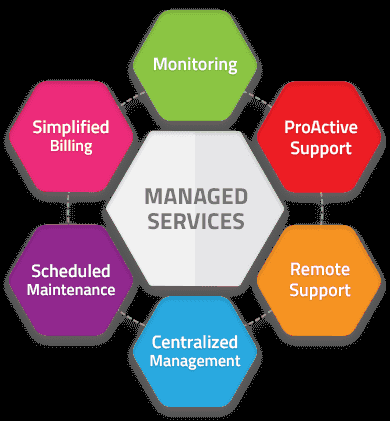 A managed IT provider that works as an extension of your business monitors your systems, resolves issues before they affect users, manages security, and advises on technology decisions that support your goals. One that doesn't generates tickets and invoices without moving anything forward. The difference between those two outcomes comes down to a handful of concrete factors that are easy to evaluate before you sign anything.
What Managed IT Services Actually Cover
Managed IT services replace or augment an internal IT team by taking ongoing responsibility for infrastructure health, security, user support, and strategic planning. The core service categories that define a capable provider:
Infrastructure management covers the hardware, operating systems, and network components your business runs on. A provider monitoring your infrastructure tracks disk health, CPU utilization, patch status, and backup integrity on a defined schedule, not just when something breaks.
Security operations include endpoint detection and response (EDR), DNS filtering, firewall management, multi-factor authentication enforcement, and vulnerability scanning. These aren't optional add-ons, they're the baseline that blocks ransomware and credential theft from becoming business interruptions.
Help desk and end-user support resolves day-to-day issues, password resets, software problems, hardware failures, connectivity issues, through a staffed support desk with defined response time commitments.
Backup and disaster recovery involves scheduled backups of critical data and systems, offsite or cloud storage, and tested recovery procedures. A backup that hasn't been restored in a test environment isn't a backup, it's an assumption.
Compliance management keeps businesses operating under HIPAA, CMMC, SOC 2, or other frameworks current on documentation, policy enforcement, and audit evidence. This matters most for businesses handling government contracts or regulated data.
Strategic advising means your provider participates in technology planning, hardware refresh cycles, software licensing decisions, and architecture changes, rather than just executing work orders.
How MSPs Monitor and Manage Your Environment
The operational backbone of a managed IT provider is a remote monitoring and management (RMM) platform. An RMM agent runs on every managed device, sending status data back to the provider in real time. When a disk starts failing, a system goes offline, or patch compliance drops, the provider sees it before you do.
For security, a separate layer handles threat detection. SIEM tools aggregate log data from endpoints, network devices, and cloud services, flagging anomalies that pattern-matching alone would miss. EDR platforms monitor process behavior on endpoints, catching threats like living-off-the-land attacks that traditional antivirus doesn't detect.
Support operations run through a ticketing system tied to service level agreements (SLAs). SLAs define response and resolution time commitments by issue priority, a downed server gets a different response window than a printer problem. Before signing with any provider, verify whether SLA commitments are response times, resolution times, or both.
A provider worth working with sends regular reports showing system health trends, ticket volumes and resolution times, security event summaries, and backup success rates. Your leadership should have visibility into IT performance without having to chase it down.
MSP Pricing Models
Most managed IT providers use one of a few standard pricing structures. Understanding the model before you compare quotes prevents apples-to-oranges confusion.
Per-user pricing charges a flat monthly rate for each employee covered. This model scales naturally with headcount and works well for businesses where each user has multiple devices. A single employee working from a desktop, laptop, and mobile device stays on one line item.
Per-device pricing charges separately for each managed asset, workstations, servers, and network equipment may each carry different rates. More granular, but it gets complex as device counts grow.
All-inclusive pricing bundles all support, monitoring, and labor into a flat monthly fee. No billing surprises from on-site visits or after-hours calls, which makes budgeting straightforward.
Tiered packages offer service bundles at different price points, monitoring-only at the base, full management and security at higher tiers. Useful if you have an internal IT person who handles some work and needs a provider to cover the rest.
Which model fits depends on your size, how much internal IT capability you retain, and what your cost ceiling looks like. Any credible provider will walk through what's included and excluded in each pricing tier before you commit.
What to Look for When Evaluating Providers
Industry and compliance experience: An MSP that has managed IT for defense contractors understands CMMC requirements. One that supports medical practices understands HIPAA's Security Rule technical controls. General IT competence doesn't transfer automatically to compliance-heavy environments, ask for references in your industry and verify that the provider has direct experience with the frameworks that apply to your business.
Security depth: Ask specifically what security tooling is included in their standard offering. A provider that answers with "antivirus and a firewall" isn't operating at the level the current threat environment requires. Look for EDR, DNS filtering, MFA enforcement, SIEM or log monitoring, and a defined incident response process.
Backup and recovery specifics: Find out where backups are stored, how frequently they run, and when the provider last tested a full restore. Recovery time objectives (RTOs) and recovery point objectives (RPOs) should be documented in the service agreement, not described verbally in a sales call.
SLA terms: Response time SLAs are only meaningful if the provider staffs them. Ask whether after-hours support is handled by the same team or routed to an answering service. For businesses with 24/7 operations or compliance requirements, an SLA that stops at 5 PM isn't adequate.
Scalability: Your provider should be able to onboard new users, add locations, and support technology changes without requiring a contract renegotiation for every shift. Get clarity on how new users are provisioned, what the process looks like when you add a remote office, and whether the pricing model adjusts cleanly as you grow.
Strategic involvement: A provider that only reacts to problems is a more expensive version of break-fix support. An MSP worth keeping brings recommendations proactively, when hardware is approaching end-of-life, when a software change creates a compliance gap, when your backup architecture doesn't match your actual recovery needs. Ask how strategic guidance gets delivered and by whom.
How Stratify IT Approaches Managed IT
Stratify IT manages IT infrastructure and security for businesses across New York and the broader metro area, with particular depth in compliance-driven environments, defense contractors working toward CMMC, healthcare organizations under HIPAA, and professional services firms handling sensitive client data.
Every engagement starts with a structured assessment that maps your current infrastructure, identifies security gaps against a defined framework, and documents your compliance obligations. The output is a prioritized remediation plan, ranked by likelihood and business impact, so decisions about where to invest first are grounded in your actual environment, not theoretical risk.
Ongoing management runs through RMM tooling with 24/7 monitoring, EDR and DNS filtering on all managed endpoints, regular patch cycles, and tested backup and recovery procedures. Security incidents are handled through defined escalation paths, so response time doesn't depend on who picks up the phone.
Compliance support for CMMC and HIPAA goes beyond checking boxes. Stratify IT manages documentation, policy enforcement, and audit evidence on an ongoing basis, which eliminates the scramble that typically precedes audits and keeps obligations current as requirements change.
Security depth, compliance experience, SLA specifics, and backup verification are all things a credible provider should answer clearly. If a proposal is heavy on general capabilities and light on specifics about your environment, that's a problem worth paying attention to.
Contact Stratify IT to schedule a structured assessment, you'll come away with a clear picture of where your current IT environment stands and a prioritized plan for what to address first. Learn more about our managed IT services to see the full range of what we offer.
For more on making the final decision, including hidden cost traps and what to look for in SLAs, see our guide on how to choose the right IT partner.
Frequently Asked Questions
Most managed IT contracts run 12 to 36 months. A one-year initial term is reasonable for a new relationship, long enough to see results, short enough to exit if things go sideways. What matters more than length is the termination clause. You want 30 to 60 days written notice with a clean data handoff obligation. Avoid auto-renewal language that locks you in without explicit opt-out, and make sure you retain ownership of all your configurations, documentation, and credentials.
Ask specifically how many technicians are on staff, what hours they're available, and whether your calls are answered domestically or routed to an offshore center. Find out if you'll be assigned a dedicated technician or working with a rotating queue. Also ask what the average ticket resolution time was over the past 90 days, not first-response time alone. Providers who can't or won't share that number usually have something to hide.
Yes, and if they don't offer this, that's a gap worth noting. A provider embedded in your environment will know when your accounting software is due for a version upgrade, whether your current phone system is creating support overhead, or when a vendor's support contract is expiring. This kind of advisory input is what separates a strategic partner from a break-fix shop with a monthly retainer attached to it.
Ask for documentation of their last successful restore test, not just confirmation that backups are running, but proof that a full recovery was executed and validated. Reputable providers test restores quarterly at minimum and can show you logs or reports. Also ask what their recovery time objective (RTO) and recovery point objective (RPO) commitments are in writing. Vague answers like 'we back up nightly' without tested recovery data is a red flag.
Realistically, 60 to 90 days. The first few weeks involve discovery, documenting your infrastructure, auditing security gaps, onboarding your users into their help desk system. Month two is typically when monitoring and security tooling is fully deployed. You shouldn't expect proactive strategic input until the provider has actually lived in your environment for a quarter. Providers who promise instant value on day one are usually skipping the discovery work that makes everything else reliable.
Not inherently, but it creates a conflict of interest worth acknowledging. A provider who earns margin on hardware sales has some financial incentive to recommend purchases you may not need. Ask whether their recommendations are vendor-agnostic and whether they'll work with equipment you source independently. The cleaner arrangement is a provider whose service fees are the primary revenue source, that aligns their incentives with keeping your environment stable rather than turning over gear.
In 2026, credible providers quote $125 to $250 per user per month for standard comprehensive packages, including security tooling, backup, and helpdesk coverage. Quotes under $100 per user almost always exclude critical services, backup, EDR, after-hours support, or compliance work, that show up later as separate invoices. Industry data suggests hidden add-on charges can increase the actual bill by 30 to 50 percent above the headline rate. Ask any prospective MSP for a written scope including what is explicitly excluded; providers who resist documenting exclusions are signaling where the surprise invoices will come from.