Table of Contents
What is Microsoft Dynamics 365?
The default assumption about ERP software, that it's expensive, rigid, and built for enterprises with dedicated IT departments, doesn't hold for Microsoft Dynamics 365. Dynamics is a modular suite of ERP and CRM applications that mid-size and multi-location businesses actually use to run operations: finance, supply chain, sales, field service, customer service, and HR. Because the modules share a common data layer and integrate natively with Microsoft 365, Azure, and Power BI, a business running Dynamics isn't stitching together separate systems, it's working from one connected platform. A 2024 Forrester Consulting Total Economic Impact study commissioned by Microsoft found that organizations deploying Dynamics 365 ERP achieved a 106% ROI with a payback period of 17 months, driven primarily by productivity gains and reduced infrastructure costs from retiring legacy systems.
The integration point matters more than it sounds. A company running separate tools for accounting, sales tracking, and inventory management is constantly reconciling data between systems that don't talk to each other. Dynamics eliminates that by design. Finance sees the same order data that sales entered. Operations sees the same inventory figures that purchasing is working from. Reports pull from one source rather than requiring manual exports and spreadsheet merges before anyone can read them.
Dynamics also integrates with SharePoint for document management, Outlook for email and calendar, Teams for communication, and Azure for cloud infrastructure. Third-party platforms like ServiceNow connect through the Power Platform. For a Microsoft Dynamics 365 implementation to deliver on that integration, it needs to be configured to match how the business actually works, which is where the implementation partner makes the difference.
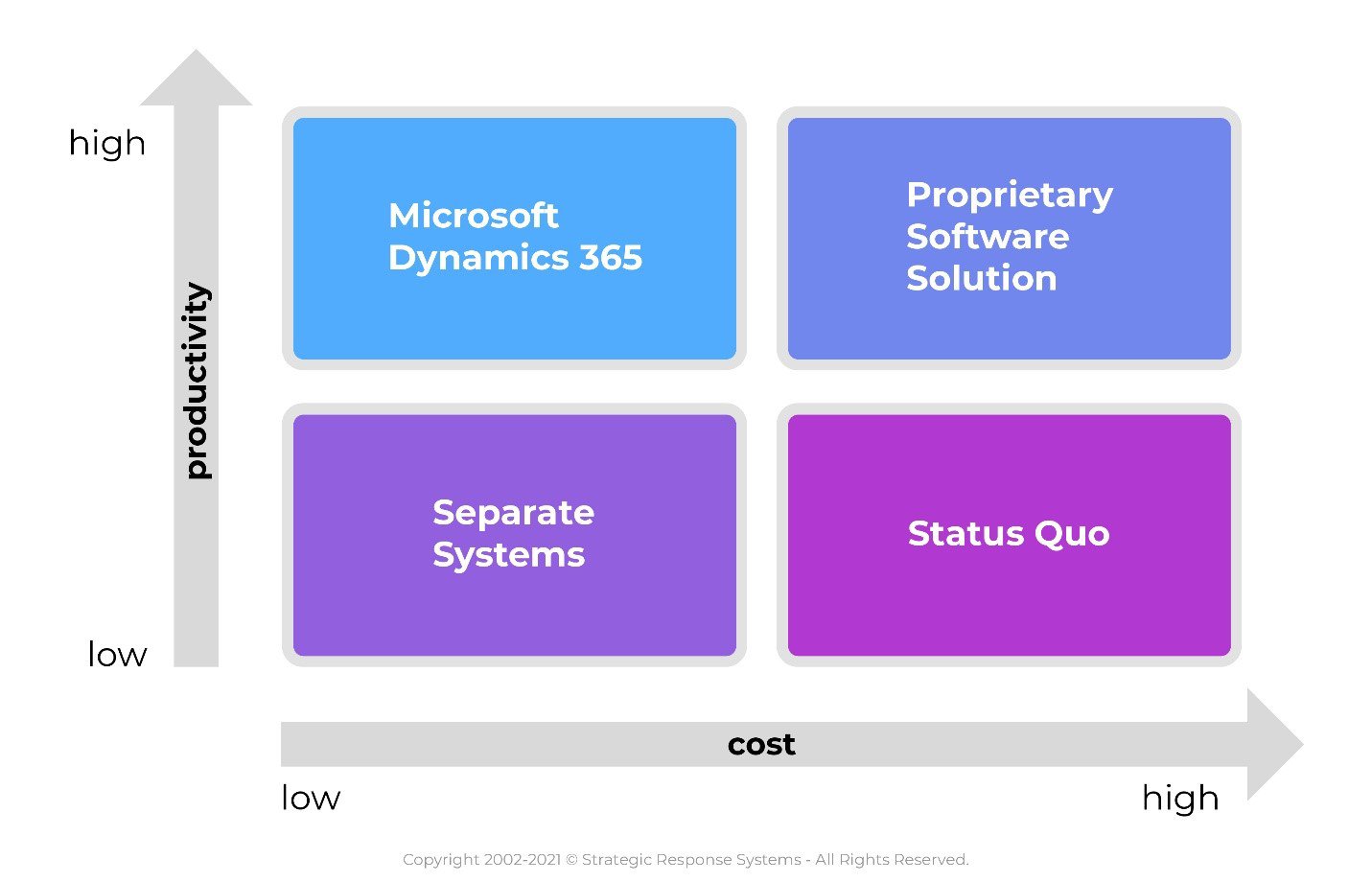
Three common situations that push businesses toward Dynamics:
- Separate point systems for different departments that require manual reconciliation and produce conflicting data;
- Proprietary custom software that's expensive to maintain, dependent on one vendor, and increasingly difficult to modify as the business changes;
- Legacy ERP platforms that have been outgrown but feel too embedded to replace, until the cost of staying starts exceeding the cost of migrating.
Who Needs Microsoft Dynamics 365?
Dynamics fits best when a business has outgrown simple accounting software but doesn't need, or can't justify, a full SAP or Oracle implementation. The typical profile: 50 to 500 employees, multiple departments or locations, and operational processes that are currently managed through a combination of spreadsheets, email, and disconnected software tools.
Specific use cases where Dynamics delivers measurable value:
- Finance and operations: Dynamics 365 Finance automates AP/AR workflows, multi-entity consolidation, and financial reporting. Closing books manually over several days can be reduced to hours with automated reconciliation and real-time ledger visibility. Across all roles, the Forrester study found that key finance, supply chain, and operations staff saved between 7 and 15 hours per week after implementation.
- Sales and CRM: Dynamics 365 Sales tracks the full pipeline, leads, opportunities, quotes, and closed deals, with activity history tied to each contact. Managers see forecast accuracy by rep and by territory without pulling data from multiple sources.
- Supply chain and inventory: Dynamics 365 Supply Chain Management connects purchasing, warehousing, and fulfillment. Inventory counts update in real time as orders are placed and received, reducing the over-ordering and stock-out cycles that come from working off stale data.
- Field service: Dynamics 365 Field Service schedules technicians based on skill, location, and availability, tracks parts inventory, and logs work order history against each asset. Service businesses scheduling through spreadsheets or phone calls see significant dispatch efficiency gains.
Automation in Dynamics is most valuable when the underlying processes are already well-defined. Automating a broken workflow produces broken results faster. The pre-implementation work, mapping processes, identifying what's working and what isn't, and deciding what the system should actually do, matters as much as the technical configuration. This is where having a partner with prior implementations in your industry pays off. They've seen what works and what doesn't before you spend money finding out.
As a long-standing Microsoft partner, Stratify IT scopes and implements Dynamics solutions with that process-first approach, understanding your workflows before configuring the system, rather than configuring first and adjusting later.
Selecting the Right Implementation Partner
A Dynamics implementation is not a software installation. It's a business process project that happens to involve software. The quality of the outcome depends heavily on the partner doing it. Gartner estimates that more than 70% of ERP implementations fail to fully meet their original business case goals, and the most common causes are inadequate planning, poor change management, and inexperienced implementation teams, not the software itself.
What to look for in an implementation partner:
- Industry experience: A partner who has implemented Dynamics for companies similar to yours, same size, same industry, same operational complexity, will recognize your workflows and anticipate problems before they become delays. Generic ERP experience doesn't substitute for it.
- Continuity: Implementation projects span months. If a key consultant leaves mid-project and is replaced by someone without context on your configuration decisions, you absorb the cost of that knowledge gap. Ask how the partner manages continuity across a project and what documentation practices they follow.
- Existing relationship: If you already work with a trusted IT services provider, they have existing knowledge of your infrastructure, your data environment, and your team's technical capacity. That head start reduces discovery time and implementation risk compared to bringing in a partner who's starting from scratch.
- Post-go-live support: The implementation is the beginning, not the end. Dynamics requires ongoing configuration adjustments, user training, and system updates. Confirm the partner's support model after the system is live, not just during the project.
What is the Cost of Your Status Quo?
The decision to stay with existing systems isn't cost-free. It just distributes the cost in ways that are easier to ignore: staff time spent re-entering data between systems, reports that require manual assembly before anyone can read them, errors that propagate because there's no single source of truth, and decisions made on data that's already a week old.
Some questions that help quantify what the current state actually costs:
- How many hours per week do staff spend reconciling data between systems that don't integrate?
- How long does it take to close the books each month, and how much of that time is manual?
- How often does a customer-facing error, wrong quote, missed order, incorrect invoice, trace back to data that didn't sync between systems?
- What does unplanned downtime cost when a critical system fails and there's no redundancy or documented recovery process?
- What opportunities have been missed because reporting was too slow or too labor-intensive to inform the decision in time?
Legacy software also carries a maintenance cost that grows over time. Custom proprietary systems require developers who understand the original codebase, and if that institutional knowledge walks out the door, the cost of maintaining or modifying the system escalates sharply. Dynamics, as a Microsoft-maintained platform, offloads that burden: security patches, feature updates, and compliance certifications are handled at the platform level, not by your internal team or a single vendor.
How Stratify IT Can Help
Stratify IT implements and supports Microsoft Dynamics 365 for mid-size businesses, from initial scoping and process mapping through configuration, data migration, user training, and ongoing support. We work with businesses moving off legacy ERP platforms, consolidating disconnected point systems, or implementing Dynamics for the first time. Our approach starts with understanding how your business actually runs before touching the system configuration.
If you're evaluating whether Dynamics is the right fit, or trying to figure out what a realistic implementation looks like for your organization, contact us to start the conversation. We'll give you a clear scope and a realistic timeline, not a sales pitch.
Frequently Asked Questions
Most mid-size implementations run between three and six months for a focused module like Finance or Sales, though that timeline stretches when data migration is complex or when a company has heavily customized its legacy system. Phased rollouts, going live with core finance first, then adding supply chain or field service, tend to land better than big-bang deployments. Rushing to meet an arbitrary go-live date is one of the more reliable ways to undermine adoption.
Data migration is usually where implementations slow down or fall apart. Legacy systems often have years of inconsistent records, duplicate vendor entries, and fields that don't map cleanly to Dynamics schema. Most projects require a dedicated data cleansing phase before anything moves. The practical advice is to migrate only what you'll actually use, historical transactions beyond three to five years rarely justify the cleanup effort and can be archived separately instead.
It depends entirely on operational complexity rather than headcount. A 30-person distributor managing multiple warehouses, vendor relationships, and field technicians has real use for Dynamics Business Central. A 45-person professional services firm with straightforward billing and no inventory probably doesn't. The modular pricing helps, you're not forced to license the full suite, but the implementation cost still needs to pencil out against what you're actually solving.
Licensing is per-user, per-month, and tiered by module and access level. Full users with read-write access cost significantly more than team members who only need read access or limited task-based functionality. Where buyers get caught is underestimating how many people actually need full licenses once you account for everyone who touches finance, operations, or customer records. Running a realistic user count with your partner before signing is worth the time.
The risk isn't usually a single catastrophic failure, it's compounding friction. Legacy systems stop receiving updates, which creates security exposure. They require workarounds that consume staff time. Reporting stays slow and manual. Meanwhile, competitors using integrated platforms are making faster decisions with cleaner data. The two-to-three year delay is rarely neutral; it typically means paying more for the migration later because technical debt accumulates and the gap between your current state and modern architecture widens.
A dedicated internal IT team isn't required, and many mid-size companies run Dynamics successfully through a combination of a trained internal super-user and an external managed services or Microsoft partner for ongoing support. The super-user handles day-to-day configuration questions and user issues; the external partner manages updates, security, and anything requiring deeper technical work. That model tends to be more cost-effective than hiring a full-time Dynamics administrator unless your usage is particularly complex.