
Table of Contents
The Role of Managed IT Services in Scalability
 A regional logistics company wins a contract that doubles their headcount overnight. Their internal IT team, two people, suddenly needs to provision 40 laptops, extend VPN access, stand up a new file server, and maintain uptime on systems that now run 24 hours a day. Six weeks in, the IT manager quits. The contract nearly goes with him.
This is the scaling problem that managed IT services exist to solve. Growth creates IT demand spikes that in-house teams, built for steady-state operations, can't absorb. A Managed Service Provider (MSP) provides the infrastructure, staffing depth, and tooling to scale IT capacity up or down with the business, without the lag of hiring, the cost of redundant hardware, or the single points of failure that come with small internal teams.
What Scalability Means in IT
In IT, scalability is just whether a system can take on more work without slowing down or needing a rebuild from scratch. There are two forms. Vertical scalability means adding capacity to existing resources, more RAM, faster processors, larger storage, to handle greater demand on the same system. Horizontal scalability means adding parallel resources, more servers, more instances, more nodes, to distribute workload across a larger infrastructure footprint. Cloud environments make horizontal scaling practical for businesses that couldn't afford to own that infrastructure outright. You provision what you need, when you need it, and release it when demand drops.
The practical bottleneck for most SMBs isn't which type of scaling they need, it's having the expertise and tooling to execute either quickly enough to match business growth. That's where MSPs close the gap.
How Managed IT Services Deliver Scalability
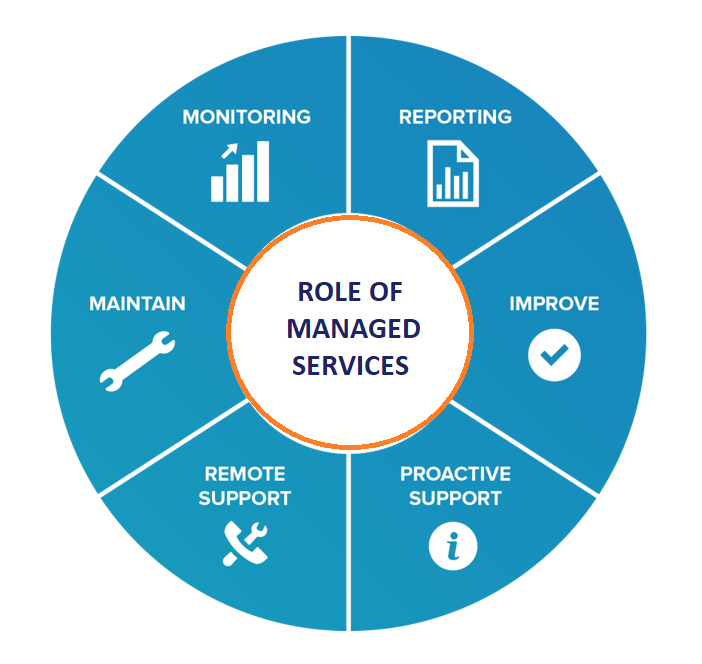
Remote Monitoring and Management (RMM): MSPs deploy RMM platforms across every endpoint, server, and network device in a client's environment. This gives them real-time visibility into system health, performance degradation, patch compliance, and capacity thresholds, before any of those issues become outages. When a business adds locations or devices, they're brought under the same monitoring umbrella immediately, with no manual configuration per device. For a growing business, this means IT oversight scales automatically with headcount.
Network Operations Center (NOC): An MSP's NOC provides 24/7 infrastructure monitoring and incident response, the equivalent of a dedicated operations team watching your environment around the clock. For businesses that operate outside standard hours, or that can't afford extended downtime, NOC coverage eliminates the gap between a problem occurring at 11 p.m. and someone discovering it at 9 a.m. the next day. As a business scales into new time zones or extends operating hours, NOC coverage scales with it at no additional staffing cost.
Cloud Infrastructure Management: MSPs provision and manage cloud environments, Microsoft Azure, AWS, Microsoft 365, and similar platforms, so businesses can add compute, storage, or user licenses in hours rather than weeks. A company opening a new office doesn't need to rack servers; the MSP extends their existing cloud environment and provisions access for the new team. When a project ends and demand drops, resources are scaled back down. This converts what used to be a capital expenditure cycle into an operational cost aligned to actual usage.
Help Desk and Tiered Support: Internal IT teams at growing companies get overwhelmed by support volume before they get overwhelmed by infrastructure complexity. Tickets pile up, response times slip, and employees work around IT problems rather than reporting them. MSP help desk services absorb that volume through defined SLAs, typically tiered by severity, so response times hold regardless of how many new employees are onboarded. Tier 1 issues (password resets, connectivity problems, software errors) are resolved without touching internal staff, freeing them for project work.
Security Stack Management: A growing business becomes a more attractive target. MSPs manage the security controls that scale with the environment: endpoint detection and response (EDR) on every new device, DNS filtering applied network-wide, MFA enforced across cloud applications, and patch management run on a defined schedule. Security posture doesn't degrade as headcount grows because the MSP's tooling applies controls uniformly, a new device added to the network is covered the same day, not after the next quarterly review.
Backup and Disaster Recovery: As data volumes grow, so does recovery complexity. MSPs implement and manage backup solutions with defined recovery time objectives (RTOs) and recovery point objectives (RPOs), and test them. A business with 10 employees and a business with 150 employees have very different recovery requirements; a managed backup service scales the solution to match. When an incident occurs, the MSP executes the recovery rather than leaving an internal team to figure it out under pressure.
The Cost Structure Advantage
Traditional IT scaling required capital expenditure decisions made in advance of growth, buy servers before you need them, hire staff before volume justifies it. This creates either over-investment (paying for capacity sitting idle) or under-investment (scrambling when growth arrives faster than planned).
MSPs convert that model to per-user, per-month operational costs that move in line with headcount. Adding 20 employees means adding 20 seats of managed services, no hardware procurement cycle, no recruiting process, no training period. Reducing headcount works in the same direction. For businesses in growth phases where IT demand is hard to predict, this alignment between cost and scale is the practical argument for managed services over internal build-out.
What to Look for in an MSP as You Scale
Not all MSPs are built to grow with their clients. When evaluating whether a provider can support your scaling needs, ask specifically about the core benefits of managed IT services, cost structure, monitoring depth, security stack, and access to specialized expertise, and whether the provider actually delivers them at scale.
SLA guarantees and escalation paths. What is the documented response time for critical outages? What happens if the SLA is missed? A provider that can't answer this specifically isn't operating at the level a scaling business needs.
Experience with your industry's compliance requirements. A business subject to HIPAA, CMMC, PCI-DSS, or SOC 2 requirements needs an MSP that understands those frameworks, not one that will learn them alongside you. Compliance requirements don't pause while you grow.
Tooling and documentation standards. MSPs that document your environment thoroughly, network diagrams, asset inventories, configuration records, make transitions, expansions, and audits far less painful. Ask to see a sample runbook or documentation package from an existing client engagement.
Partner with Stratify IT
Stratify IT provides managed IT services built around the demands of growing businesses, NOC monitoring, help desk support, cloud infrastructure management, security stack deployment, and backup and recovery. Whether you're adding locations, onboarding large cohorts of employees, or meeting a compliance requirement tied to a new contract, we scale the IT infrastructure with you.
Contact us to discuss your growth plans, or explore our managed IT services to see how we structure projects for scalability from day one.
Stratify IT, managed IT that grows with your business, not behind it.
Frequently Asked Questions
Ask for references from clients who went through a significant growth event, a merger, a sudden headcount surge, an acquisition. Then ask the MSP what their average ticket response time looked like during that period, not just normally. A provider with shallow bench depth will show cracks under load. You want to see documented SLAs that don't have carve-outs for 'unusual demand,' and a clear answer on how many technicians are behind your account.
Most practitioners put that threshold somewhere between 150 and 250 employees, but headcount alone is a poor metric. The real question is whether you have enough specialized, predictable IT work to justify full-time salaries across multiple disciplines, networking, security, helpdesk, and systems administration. Many companies at 300+ employees run a hybrid model: a small internal IT director or team handles strategy and vendor relationships, while the MSP handles execution and after-hours support.
This is a real risk that most buyers ignore during the sales process. Your contract should specify data portability terms, including format and timeline for data return, and you should maintain independent access to your own backup repositories rather than relying solely on the MSP's infrastructure. If your MSP uses a proprietary RMM or documentation platform, ask what export options exist. MSP acquisitions are common, and the acquiring company may not carry over your contract terms or service quality.
This is actually where MSPs have a structural advantage over internal teams. A retailer that needs 30% more IT capacity from October through January can't justify hiring for that peak. An MSP spreads that demand across its entire client base, so the surge from one client is absorbed without dedicated headcount. The key is building this into your agreement upfront, you want a contract that allows elastic scaling without triggering expensive change orders every time you spin up temporary workstations or add a pop-up location.
MSPs typically own the technical controls, patch management, endpoint protection, firewall configuration, monitoring. What doesn't transfer is legal and regulatory accountability. If you're subject to HIPAA, PCI DSS, or state privacy laws, the business remains the responsible party. Your MSP can help you achieve compliance, but a breach caused by a misconfigured system they manage doesn't automatically shift liability. Contracts should clearly define the MSP's security responsibilities, and you should require evidence of their own security practices, like a SOC 2 report.
Most MSPs quote 30 days. Realistically, for a business with any complexity, multiple locations, mixed environments, legacy systems, or incomplete documentation, expect 60 to 90 days before things run smoothly. The first few weeks involve discovery and documentation, which often uncovers deferred problems the previous team never resolved. Budget for a transition period where ticket volume is higher than normal and some processes still feel manual. That stabilization phase is normal, not a red flag.
Plan for $100 to $300 per user per month for comprehensive managed IT in 2026, scaling with company size and compliance scope. A 25-person company typically spends $2,500 to $7,500 monthly; a 100-person company in the $15,000 to $25,000 range. Volume discounts of 10 to 20 percent are common above 200 users. Co-managed IT, where an internal admin handles day-to-day and the MSP covers nights, security, and specialized work, runs $65 to $120 per user per month and is the fastest-growing model for organizations with 50 or more employees. Hidden costs to budget for: onboarding fees of $2,000 to $10,000, project work billed separately, and compliance add-ons.